
Moisture is one of the common causes of inconsistent 3D printing results. During storage, filament can absorb moisture from the surrounding air, especially when exposed to high-humidity environments for extended periods. Depending on the material, moisture absorption can affect extrusion stability, surface quality, layer adhesion, mechanical properties, and overall print reliability.
Proper filament storage is therefore about more than simply keeping filament away from water. Effective storage requires controlling the surrounding humidity and minimizing the filament’s continued exposure to moisture in the air.
This guide explains how humidity affects 3D printing filament, why drying and storage serve different purposes, and how a dehumidifying storage cabinet such as the SUNLU FilaDC i10 Filament Dehumidifying Cabinet can help maintain more stable filament conditions between prints.
Why Does 3D Printing Filament Need Proper Storage?
Most 3D printing filaments have some degree of hygroscopicity, meaning they can absorb moisture from the surrounding environment. The rate and amount of moisture absorption depend on factors such as material type, ambient humidity, temperature, exposure time, and the condition of the filament itself.
Once moisture enters the filament, it can affect extrusion during printing. Depending on the material and its moisture content, users may experience bubbling, popping, stringing, inconsistent extrusion, rough surfaces, or reduced mechanical performance.
Some materials are particularly sensitive to moisture. These commonly include:
- Nylon and other polyamide-based materials
- TPU
- PVA
These generally require more careful moisture management than PLA. However, even materials that are relatively less moisture-sensitive can benefit from proper storage when exposed to humid environments for extended periods. Always follow the manufacturer’s storage guidelines for each material.
The key point is that filament condition can change not only during printing, but also gradually while the filament is sitting on a shelf or stored between uses.
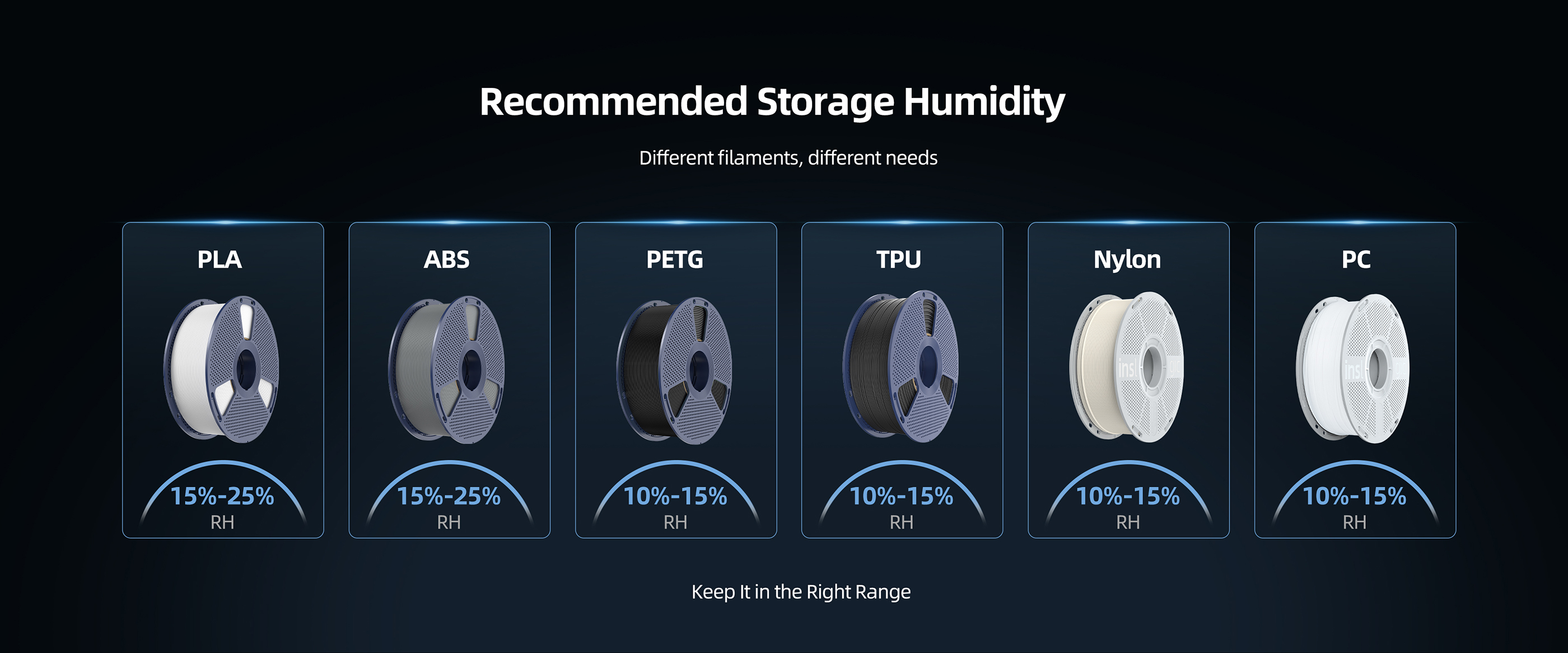
Relative Humidity and Filament Moisture Content Are Not the Same
Relative humidity (RH) describes the amount of moisture in the air relative to the maximum amount of moisture the air can hold at a given temperature. It is an environmental measurement and does not directly indicate how much moisture is actually contained within the filament.
Filament moisture content refers to the amount of water that the material has actually absorbed. The two are related, but they should not be treated as equivalent measurements.
For example, placing a spool of filament in a storage cabinet at 10% RH does not mean that the filament itself will immediately become extremely dry. If the filament has already absorbed moisture, it will take time for moisture to gradually migrate out of the material and for the filament to move toward a more stable state in the controlled environment.
Therefore, when evaluating a filament storage system, it is important to distinguish between ambient humidity and filament moisture content. A low-RH environment can help reduce further moisture absorption, but it should not simply be interpreted as a rapid drying process.
Does Lower Humidity Always Mean Better Filament Storage?
Lower humidity generally helps reduce the amount of moisture that filament is exposed to. However, this does not mean that the lowest possible RH is necessarily ideal for every material or application.
Filament performance is influenced by its polymer composition as well as its storage conditions. Some PLA materials, for example, may become relatively more prone to brittleness after prolonged exposure to extremely dry conditions. This does not mean that PLA should always be stored within one specific RH range. Rather, it highlights the importance of considering the characteristics of the material itself instead of treating a single humidity value as a universal standard for all filaments.
For everyday filament storage, the more important goal is to maintain a controlled and relatively dry environment while minimizing unnecessary exposure to moisture.
How Long Does Filament Take to Reach a Stable Condition?
The time required for filament to reach a stable condition depends on factors such as its initial moisture content, material type, spool size, environmental conditions, and storage system.
If filament has been exposed to a humid environment for an extended period, the time required to reach a stable condition in a controlled low-humidity environment will vary depending on the material. The exact time can also be affected by factors such as filament type, spool size, initial moisture content, and the conditions inside the dehumidifying cabinet.
The FilaDC i10 is designed to help maintain the condition of dry filament and support long-term storage in a low-humidity environment. However, it is not intended to replace the function of a dedicated filament dryer. In comparison, filament that is already relatively dry may reach a stable storage condition more quickly.
This difference also highlights why a dehumidifying storage cabinet should not be considered a replacement for a dedicated filament dryer. A dehumidifying storage cabinet is primarily designed to maintain a controlled storage environment, rather than rapidly remove a large amount of moisture from heavily saturated filament.
Drying vs. Storage
| Aspect | Drying | Storage |
| Primary goal | Remove moisture already absorbed by filament | Prevent filament from absorbing moisture again |
| When to use | Before printing, when filament shows moisture issues | Between prints and over longer periods |
| Speed | Targets faster moisture removal | Maintains a stable, controlled environment |
| Typical device | Dedicated filament dryer | Dehumidifying storage cabinet (e.g. FilaDC i10) |
Why Can Humidity Temporarily Increase During Dehumidification?
Users may sometimes notice that the humidity displayed inside a dehumidifying storage cabinet does not continuously decrease and may temporarily increase instead. This can be a normal part of the moisture-control process.
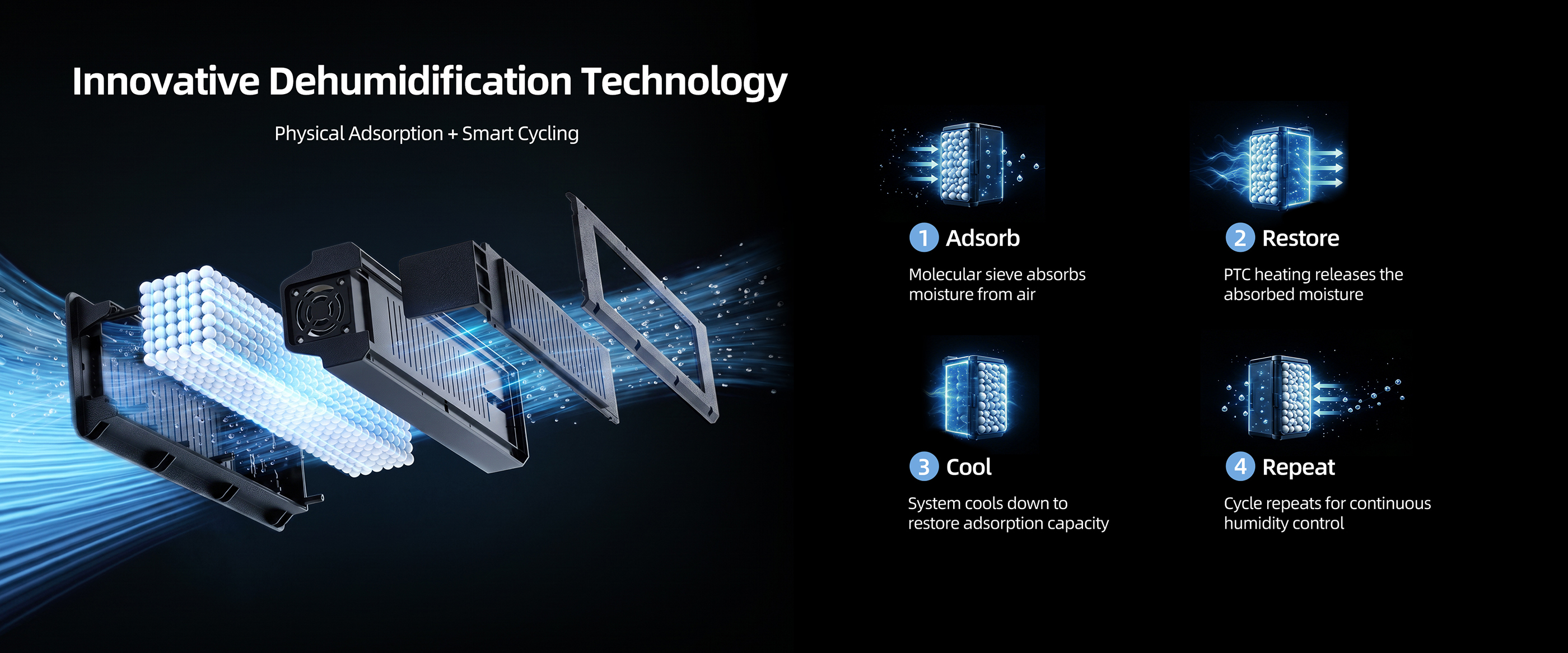
The SUNLU FilaDC i10 uses a moisture management system based on adsorption and regeneration. During regeneration, moisture collected by the desiccant is released and removed from the system. As a result, the heating and moisture-removal process may cause temporary changes in the RH reading inside the cabinet.
After regeneration is completed and the system cools down, it returns to the moisture-adsorption stage. As the air inside the cabinet and the stored filament gradually move toward a more balanced condition, the humidity reading will also stabilize.
Therefore, the RH displayed by the cabinet should be understood as a measurement of the current humidity of the air inside the cabinet, rather than a direct measurement of the actual moisture content of each spool of filament.
Why Does the SUNLU FilaDC i10 Use Molecular Sieves?
The SUNLU FilaDC i10 uses a molecular-sieve-based moisture management system to maintain a low-humidity environment for filament storage.
Molecular sieves are porous materials capable of selectively adsorbing water molecules. Their moisture adsorption properties make them suitable for applications that require relatively low-humidity environments.
Under the company’s test conditions, molecular sieves demonstrated stronger performance in maintaining low humidity compared with silica gel. After 1,000 regeneration cycles, the molecular sieve retained approximately 95% of its water adsorption capacity, while the silica gel used in the same internal comparison test retained approximately 70%. Based on internal testing; actual results may vary by environment.
What Is the Maximum Temperature of the SUNLU FilaDC i10 PTC Heating Module? Can It Regenerate the Molecular Sieve?
The i10 PTC heating module has a maximum tested temperature of 260°C (500°F) under specified test conditions. However, this does not mean that every part of the molecular sieve reaches or continuously remains at 260°C during each operating cycle.
Molecular sieve begins to desorb absorbed moisture at approximately 230°C (446°F). Since the i10 PTC heating module can reach up to 260°C under test conditions, it provides the heat required for moisture desorption and molecular sieve regeneration.
Actual desiccant temperature and regeneration performance may vary depending on factors such as ambient temperature, airflow, desiccant quantity, and cycle duration.
How Does the SUNLU FilaDC i10 Maintain a Low-Humidity Environment?
The FilaDC i10 uses continuous moisture management rather than relying solely on heating the filament to achieve drying.
The system monitors the humidity inside the cabinet and manages moisture through a cycle that includes adsorption, regeneration, moisture removal, and cooling. When humidity rises, the system can initiate the regeneration and moisture-removal process before returning to the adsorption stage.
Because moisture can continuously enter the cabinet through the filament itself as well as through normal door openings, maintaining a low-humidity environment requires ongoing moisture management rather than a one-time drying cycle.
This is an important distinction between the FilaDC i10 and traditional heated filament dryers. The primary purpose of the FilaDC i10 is to provide a controlled storage environment for filament between printing sessions.
How to Build Better 3D Printing Filament Storage Habits
Developing an effective filament storage routine starts with understanding the current condition of the filament.
A simple storage routine:
1. Check – Assess whether the filament shows signs of moisture-related printing issues.
2. Dry – If needed, use an appropriate drying method based on the material’s characteristics.
3. Store – Once the filament is in a suitable condition, place it in a controlled low-humidity environment.
4. Maintain – Keep the filament in the controlled environment between uses to reduce further moisture absorption.
For filament that is already dry, storing it in a controlled low-humidity environment can help maintain its condition for longer, particularly in humid environments.
Consistency is one of the most important principles of filament management. If stable printing performance is the goal, filament should ideally not be repeatedly moved between a dry environment and humid open air.
How Does the SUNLU FilaDC i10 Fit into Filament Storage?
The FilaDC i10 is primarily designed for the storage stage of filament management. Instead of exposing dry filament to indoor air after every printing session, users can keep their filament in a controlled low-humidity environment between uses.
This approach can be particularly useful for users who frequently work with moisture-sensitive materials or need to store multiple spools for extended periods. By continuously monitoring and managing humidity, the FilaDC i10 helps reduce the risk of filament repeatedly absorbing moisture during storage.
For users who frequently switch between different materials, work on long-term printing projects, or live in humid environments, maintaining a stable storage environment can become an important part of achieving more consistent printing results.
Conclusion
Filament storage is an important part of achieving consistent 3D printing results. Taking filament out of a dryer does not mean moisture management is finished. For long-term storage, keeping filament in a controlled environment is equally important.
The key is to understand the difference between drying and storage. Drying is intended to remove moisture that the filament has already absorbed, while low-humidity storage helps prevent the filament from absorbing moisture again.
For users who want to better protect filament between printing sessions, a dedicated dehumidifying storage solution such as the SUNLU FilaDC i10 Filament Dehumidifying Cabinet can provide a controlled environment through continuous humidity management.
Learn more about the SUNLU FilaDC i10.
Better filament management does not begin and end with choosing the right material. It extends throughout the entire workflow—from storage and preparation to printing—helping keep filament in a suitable condition for more consistent results.